On Budtello, Oregon's wholesale cannabis marketplace, go to Sell, then Requests, to see every open buyer request in Oregon and send a quote on the ones you can fill.
How to do it
- Open Sell, then the Requests tab, to see every open buyer request in Oregon, under Open
- Read the row: Qty, Up to / lb, Type, Grow, Grade, THC, Nose and Tested, plus Quotes showing how many sellers have quoted
- Click Quote on a row you can fill
- Under What you are quoting, pick one of your lots or choose A strain you name and fill in Strain and Grade, then type Your price and the Pounds, adding a note if the buyer should know something such as harvest, pickup or terms
- Click Send quote
Video
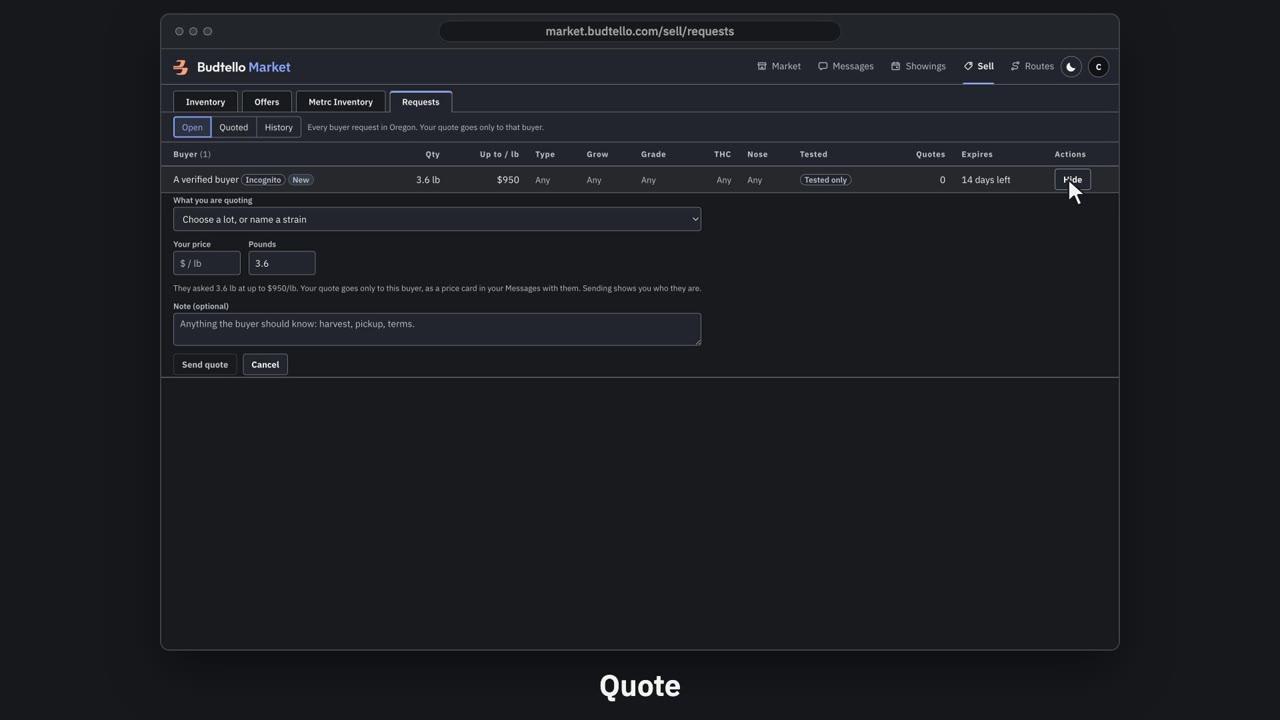
Answer a request with a quote · 0:43
Video transcript
How to answer a buyer's request with a quote. Requests shows what dispensaries across Oregon want to buy. How many pounds, and the most they'll pay a pound. Quotes: how many sellers have answered. Press Quote. Pick one of your lots, and type your price. Send it. Only this buyer sees it. Sent. It's in your Messages with them now. Under Quoted, you can edit it, or withdraw it. Withdraw closes the price card. The full guide is in Budtello's help pages.
Good to know
- You never see other sellers' prices on a request, only how many have quoted
- A buyer who posted as a verified buyer shows their name once you send your quote
- Price one lot on Sell first; until then the Requests tab reads Price one lot on Sell first