On Budtello, Oregon's wholesale cannabis marketplace, a wholesaler opens a dispensary's open request on Sell and sends back a formal quote naming a lot, a price and a pounds figure, instead of a phone call or an email.
How to do it
- Read every open buyer request under Open on the Requests tab, including the Qty, Up to / lb, Type, Grow, Grade, THC, Nose and Tested on each row, before deciding whether to quote.
- Press Quote on a request and pick one of your lots, or name a strain and grade under A strain you name, so the quote matches what that buyer asked for.
- Fill in Your price and the Pounds, add anything the buyer should know in the note field, then press Send quote so it reaches that buyer as a price card and the request moves to Quoted.
- Once it's sent, the buyer can press Open conversation on their side to work out the price with you in Messages.
Video
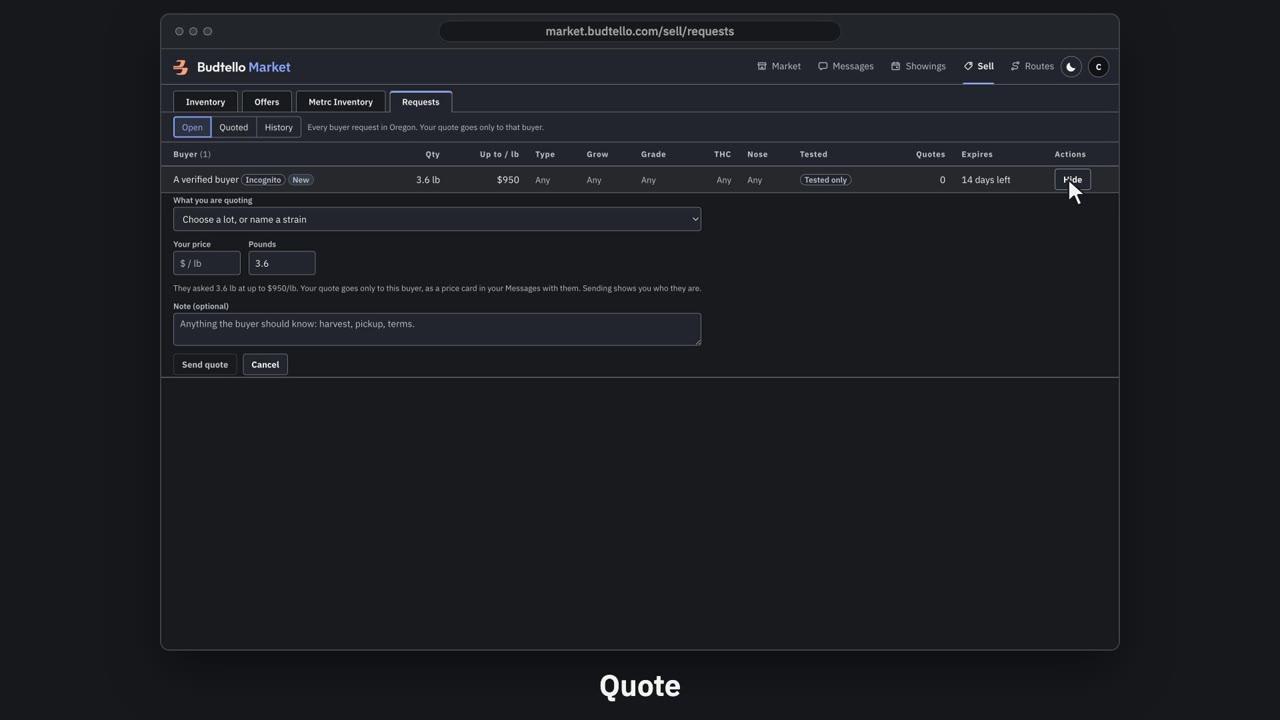
Answer a request with a quote · 0:43
Video transcript
How to answer a buyer's request with a quote. Requests shows what dispensaries across Oregon want to buy. How many pounds, and the most they'll pay a pound. Quotes: how many sellers have answered. Press Quote. Pick one of your lots, and type your price. Send it. Only this buyer sees it. Sent. It's in your Messages with them now. Under Quoted, you can edit it, or withdraw it. Withdraw closes the price card. The full guide is in Budtello's help pages.
Good to know
- A phone call or email leaves no record of the strain, grade, pounds and price together on one card the buyer can compare against other quotes
- A quote goes only to that buyer; a seller never sees what other sellers quoted on the same request
- The quote and the follow-up talk stay attached to the same request, instead of scattered across calls and emails
Step by step
- How do I post a request to buy flower in Oregon?
- How do I respond to a dispensary's request with a quote for my lot?
- How do I download a PDF of an offer I sent to a customer?